What Is ToolPikz?
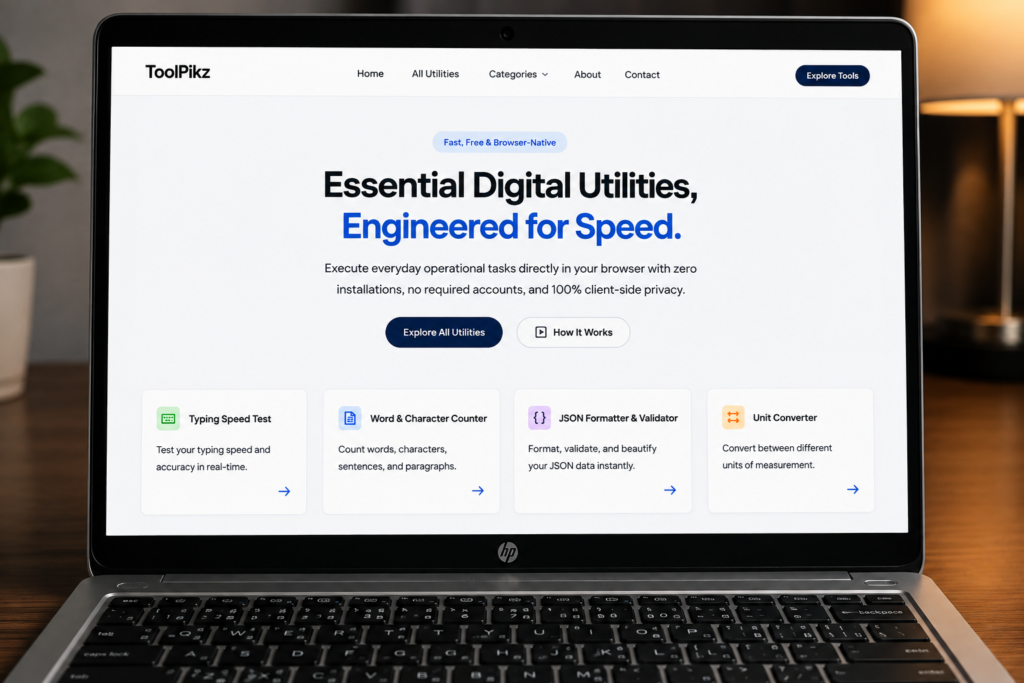
ToolPikz is an online toolkit designed to make common digital tasks faster, simpler, and more convenient.
Instead of searching the internet for a separate website every time you need to count words, change text formatting, generate a QR code, calculate something, or perform another everyday task, ToolPikz brings useful web-based utilities together in one convenient place.
The platform is designed with practical users in mind. Whether you are a student preparing an assignment, a college student working on a project, a writer checking an article, a blogger preparing content, a data entry professional processing text, or a freelancer completing work for a client, online tools can save time and reduce repetitive work.
ToolPikz aims to provide simple tools that can be opened directly in a web browser without requiring complicated software installation.
Why Are Online Tools Useful?
The internet has made many tasks easier, but it has also created a problem: there are thousands of websites and applications for different purposes.
One website may provide a word counter. Another may provide a text converter. A different service may generate QR codes, while another may provide calculators.
Finding the right tool every time can become frustrating.
A centralized online toolkit can make this process easier by putting frequently needed utilities in one place
For students and professionals, this can mean less time spent searching for tools and more time focused on the actual work.
ToolPikz for Students
Students frequently work with documents, assignments, notes, presentations, research material, calculations, and online resources.
ToolPikz can be useful for students who need quick browser-based utilities during their studies.
1. Word Counting for Assignments
Many academic assignments have word-count requirements.
A student may need to write an essay containing 500, 1,000, 1,500, or more words. Manually counting words is obviously impractical.
A word-counting tool can quickly provide information such as:-
- Total words
- Character count
- Text length
- Reading-related statistics
- Other useful text information
This can help students check whether their assignment meets the required length.
2. Text Case Conversion
Students often copy text from different sources and need to change its formatting.
A text case converter can be useful when converting text into formats such as:
UPPERCASE
- lowercase
- Title Case
- Sentence case
Instead of manually changing every letter, students can use an online text tool to perform the conversion much faster.
3. QR Codes for Projects
QR codes are increasingly used in educational projects, presentations, posters, events, and classroom activities.
For example, a student could create a QR code that points to:
- A project website-
- A Google Drive document
- A presentation
- A portfolio
- A research resource
- A video
- Contact information
A QR code generator makes this process simple.
ToolPikz for College and University Students
College and university students often deal with more complex assignments and projects.
They may need to work with large amounts of text, calculations, online research, presentations, and digital documents
ToolPikz can serve as a quick utility hub for these everyday tasks.
Save Time on Repetitive Tasks
One of the biggest advantages of online utilities is convenience.
If a task takes only a few seconds with the right tool but several minutes manually, using the tool repeatedly can save significant time over the course of a semester.
This is particularly useful when working on:
- Research projects
- Assignments
- Reports
- Presentations
- Lab work
- Online applications
- Academic notes
- Group projects
ToolPikz for Writers and Bloggers
Writers deal with text constantly.
Whether you are writing blog posts, articles, stories, scripts, product descriptions, social media content, or newsletters, text-processing utilities can become part of your everyday workflow.
Word Count Matters for Writers
Word count is useful for more than academic assignments.
Bloggers may use word counts to estimate article length. Freelance writers may have client requirements. Authors may track chapter length, while copywriters may need to work within specific limits.
A quick word-count tool can make this process easier.
Formatting Text Faster
Writers frequently copy text between documents, websites, content management systems, and other applications.
Text formatting can become repetitive.
A text conversion utility can help writers quickly transform text without manually editing every word.
Better Productivity for Content Creators
The goal of a productivity tool is not to replace creativity.
Instead, it should reduce repetitive tasks so creators can spend more time thinking, researching, writing, editing, and publishing.
That makes simple online utilities valuable additions to a writer’s workflow.
ToolPikz for Data Entry Professionals
Data entry workers often perform repetitive text-based tasks.
Depending on the job, they may need to process names, addresses, lists, records, copied information, or other textual data.
Small utilities can help reduce unnecessary manual work.
Text Processing
When handling large amounts of text, basic information such as word counts and character counts can be useful for checking data.
For example, a data-entry worker may want to quickly determine whether a field contains an expected amount of text.
Formatting Consistency
Data entry often requires consistency.
If information is entered using different capitalization styles, a text case converter can help standardize the presentation of text.
For example:
“john smith”
could be converted to:
“John Smith”
or
:”JOHN SMITH”
depending on the required format.
ToolPikz for Freelancers
Freelancers often work across multiple categories.
A single freelancer might write articles in the morning, prepare spreadsheets in the afternoon, create social media content later, and handle client documents at night.
Because freelancers frequently switch between tasks, having quick utilities available in a browser can be convenient.
ToolPikz can complement workflows involving:
- Content writing
- Virtual assistance
- Data entry
- Blogging
- Digital marketing
- Student services
- Research
- Basic document preparation
- Online business tasks
ToolPikz for Teachers and Educators
Teachers can also benefit from simple online utilities.
For example, text tools can help prepare classroom material, while QR code generators can be useful for sharing digital resources.
A teacher could create a QR code for:
- – Reading material
- A classroom website
- A video lesson
- An online assignment
- A digital worksheet
- A feedback form
Simple tools can therefore become useful parts of a modern classroom workflow
ToolPikz for Content Creators
YouTubers, bloggers, social media creators, and digital marketers regularly work with text and digital assets.
Creators may need to prepare descriptions, titles, scripts, links, promotional material, and other content.
Creators may need to prepare descriptions, titles, scripts, links, promotional material, and other content.
Having frequently used utilities available from a single toolkit can make routine tasks more efficient.
A good online toolkit should not focus on only one type of user.
Different users need different utilities.
ToolPikz can be organized into practical categories such as:
- Text Tools
Text tools can help users manipulate, analyze, and format written content.
Examples include:
- Text Case Converter
- Word Counter
- Font Changer
- Other text-processing utilities
- Calculator Tools
Calculators are useful for students, professionals, business owners, and everyday users.
A calculator section can provide convenient access to different types of calculations without requiring users to install dedicated software.
- QR Code Tools
QR tools can help users create and scan QR codes for websites, documents, contact information, and other digital resources.
- Media and Creator Tools
Content creators often need specialized utilities for working with online media.
For example, a creator may need tools related to thumbnails, images, text, or other digital content.
Why Use Browser-Based Tools?
One major advantage of browser-based tools is accessibility.You generally do not need to install a separate application for every small task.A modern browser can provide access to many utilities from:
- Computers
- Laptops
- Tablets
- Smartphones
This can be especially useful for students and freelancers who work across multiple devices.
ToolPikz and Productivity
Productivity is not always about doing more work.
Sometimes it is about removing unnecessary steps.Imagine repeatedly performing the same small task manually.One task might take only 30 seconds.That does not sound significant.But if you perform it 50 times, those 30-second tasks add up.Simple utilities can reduce this type of repetitive work.For students, writers, and data-entry professionals, these small improvements can make everyday workflows more efficient.
Is ToolPikz Free?
ToolPikz is designed around the idea of providing convenient online utilities that users can access directly through the web.The availability and features of individual tools may vary as the platform develops, so users should check the specific ToolPikz tool page for the latest information.
Do You Need to Install Software?
One of the key benefits of web-based utilities is that many tasks can be performed directly inside a browser.This can reduce the need to download separate software for simple jobs.For users working on shared computers, college computers, office systems, or lower-storage devices, browser-based tools can be particularly convenient.
ToolPikz for Everyday Internet Users
You do not have to be a student, writer, or professional to benefit from online tools.Everyday users may need utilities for:
- Converting text
- Counting words
- Creating QR codes
- Performing calculations
- Working with digital content
- Preparing documents
- Managing small online tasks
A good toolkit should be useful even when you only need a tool occasionally.
How to Use ToolPikz
Using an online tool should be simple.
A typical workflow looks like this:
Step 1: Choose the Tool
Find the ToolPikz utility that matches your task.
Step 2: Enter Your Information
Depending on the tool, you may enter text, numbers, a URL, or another type of input.
Step 3: Process the Information
Use the tool’s controls to perform the required operation.
Step 4: Review the Result
Check the generated result before using it in your assignment, article, project, or professional work.
Step 5: Copy or Use the Result
Once you are satisfied, use the result wherever you need it.
Tips for Getting Better Results From Online Tools
Online tools are useful, but they should be used intelligently.
Always Check Important Results
For basic utilities, results are usually straightforward. However, important calculations, academic work, professional documents, and business information should always be reviewed.
Protect Sensitive Information
Avoid entering passwords, private documents, financial information, personal identification numbers, or confidential company data into online services unless you understand how the service handles that information.
Use the Right Tool
Do not use a tool simply because it is available.
Choose a utility that actually matches the task you are trying to complete.
Keep Your Workflow Simple
The best tool is often the one that solves your problem with the fewest unnecessary steps.
ToolPikz vs. Installing Many Small Applications
Installing a separate application for every small task can make a device cluttered.
Browser-based tools can offer an alternative for simple jobs.
Instead of installing one application for word counting, another for text conversion, another for QR generation, and another for basic calculations, users can access web-based utilities when needed.
This can be particularly convenient for students and people who use multiple computers.
Why ToolPikz Can Be Useful for Students on a Budget
Students often have limited access to expensive software.
Free or accessible web-based utilities can therefore be valuable.
A student may not need a large professional software package just to perform a simple calculation, count words, convert text, or generate a QR code.
The purpose of a lightweight online toolkit is to make those everyday tasks easier without unnecessary complexity.
The Future of Online Productivity Tools
Online tools are becoming increasingly specialized.
Instead of relying on one giant application for every task, users can choose small utilities designed for specific jobs.
This approach can make workflows more modular.
- Students can select educational utilities.
- Writers can select writing utilities.
- Freelancers can select productivity tools.
- Data-entry professionals can select text-processing utilities.
- Content creators can select creator-focused tools.
ToolPikz fits into this broader idea of making useful digital utilities available from the web.
Frequently Asked Questions About ToolPikz
What is ToolPikz?
ToolPikz is an online toolkit that provides practical web-based utilities for students, writers, data-entry professionals, freelancers, content creators, and everyday users.
Who can use ToolPikz?
Almost anyone can use online utilities. ToolPikz is particularly useful for students, college and university students, writers, bloggers, freelancers, data-entry workers, teachers, researchers, and digital creators.
Is ToolPikz useful for students?
Yes. Students can use relevant tools for tasks such as word counting, text formatting, calculations, QR-code creation, and other everyday academic activities.
Can writers use ToolPikz?
Yes. Writers and bloggers can use text-related utilities to help with repetitive tasks such as checking word counts and changing text formatting.
Can data-entry workers use ToolPikz?
Yes. Data-entry professionals can benefit from text-processing and formatting utilities that help reduce repetitive manual work.
Does ToolPikz require software installation?
Many web-based utilities can be accessed directly through a browser, making them convenient for users who do not want to install separate software for every small task.
Can college students use ToolPikz?
Yes. College and university students can use online utilities for assignments, projects, research-related tasks, presentations, and everyday digital work.
Is ToolPikz a replacement for professional software?
Not necessarily. Simple online utilities are designed for specific tasks. Professional software may still be necessary for advanced workflows.
Final Thoughts
ToolPikz is built around a simple idea: useful digital tools should be easy to find and easy to use.
Students can use online utilities to save time on assignments and projects. College students can use them for academic workflows. Writers and bloggers can use text tools during content creation. Data-entry professionals can use formatting and text-processing utilities for repetitive tasks. Freelancers and content creators can incorporate them into their everyday workflows.
The value of a good online toolkit is not necessarily in having the most complicated features. It is in solving common problems quickly.
As more tools are added and existing utilities continue to improve, ToolPikz can become a practical destination for people looking for simple, accessible, browser-based tools.
Whether you are writing an assignment, preparing an article, processing text, working on a college project, entering data, or simply trying to complete a quick online task, ToolPikz is designed to help you get the job done with fewer unnecessary steps.
Why Are Browser Based Tools Useful?
One major advantage of browser-based tools is accessibility. The W3C Web Accessibility Initiative provides standards and resources for making websites and digital tools more accessible to people with disabilities.